Creating a Custom File
DSTS also supports creating your own custom files. To do this, press the "+" icon on the bottom right of the atlas list (Fig. 1 in Introduction) with no files loaded.
DSTS will then prompt you for an atlas name, as well as what DXGI format to use. You probably want to leave Blank Image disabled, as you're writing a file rather than adding a new atlas, so it won't have a layout and therefore can't have subtextures.
Find out more about DXGI Formats
Which format to use can be tricky. BC7 is pretty much lossless, whilst BC1 is lossy. DS2 icons will typically use BC3. The best way to know is to look at what other textures similar to what you're making use.
After adding your new textures using images from your PC, go to File -> Apply Changes.
You will be prompted for each file you're exporting:
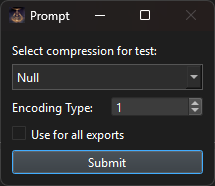
- Compression: What compression to use. Leave as
Nullfor uncompressed, which is what you want for custom DS2 icons. UseDCX_KRAKfor games that use oodle. The most common use for this would be writing "MENU_Knowledge_" files for Elden Ring/Nightreign's00_solohigh res texture files. - Encoding type: 0/2 = shift_jis_2004, 1 = UTF-16.
- Use for all exports: Simple flag that reuses the above 2 settings for all queued files. Useful if you're making many files of the same type.