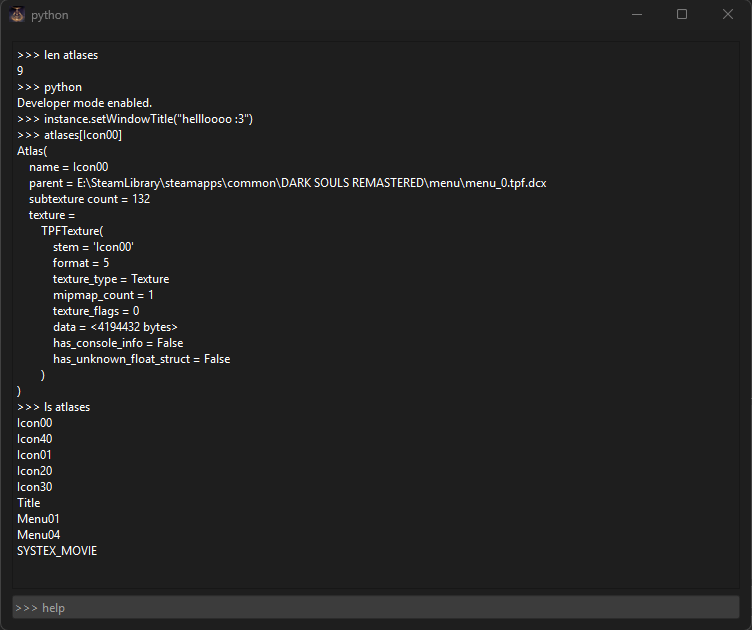
Console
The console is a new addition to DSTS, added in version 3.6.1. It allows viewing logs and errors, inspecting the program's loaded data, as well as executing python code.
Commands:
- help: Prints a help message, explaining each command.
- clear: Clears console.
- objects: Lists all available objects for inspection. See: "Objects"
- ls: Lists all items in an iterable object.
- repr: Returns an object's __repr__(). Calling an object alone will execute this by default.
- len: Prints the length/amount of items in an iterable object.
- verbose: Toggles verbose mode. This sets the console's logging level to DEBUG, showing addition logs beyond INFO.
- python: Toggles dev mode, allowing code execution. IMPORTANT: Only do this if you know what you're doing.
Objects:
- additions: Prints queued additions (custom icons) to atlases. Internally,
instance.pending_additions. - atlases: Returns dict for internal
instance.atlases. Maps atlas name to Atlas object. - cache: Prints preview image cache. Maps atlas name to PIL Image object. Internally,
instance.thumbnail_cache. - changes: Returns ALL changes, same as calling
additions,replacements, andnew - game: Returns currently loaded Game type. Internally,
instance.game. - crop: Returns PIL Image object for subtexture preview. Atlases are None.
- current: Returns name of currently selected atlas. Acts as a variable in commands.
- instance: A reference to the TextureStudio instance, aka the application itself. Mostly useful for inspecting internal variables in dev mode.
- layouts: Prints loaded layout files. Internally,
instance.LAYOUT_DATA. Maps file Path to its AtlasLayout object. - loaded: Prints loaded texture files. Internally,
instance.LOADED_DCX_FILES. Maps file Path to its TPF object. - new: Prints queued custom atlases. Internally,
instance.pending_new_atlases. A parent file of "None" means the file is custom and will be written standalone. - replacements: Prints queued texture replacements. Internally,
instance.pending_replacements
Syntax:
Commands and objects are seperated by spaces. Use [] for scripting/lookups and . for properties.
Some Usage Examples:
ls atlases - Lists the names of all loaded atlases.
repr atlases[Icon00] or atlases[current] - Prints the Atlas object's repr(), giving useful info.
layouts[0][0].xml - Since layouts is a dictionary, [0] will get all AtlasLayout objects from the first sblyt file. Another [0] selects only the first AtlasLayout. The .xml property returns its Element as text to the console, allowing you to see the xml before it's written.